AMD Custom Resolution Setting for BenQ EX3501R Ultra Wide Monitor
Product: BenQ EX3501R Ultra Wide 35" Monitor
AMD Radeon Ver 2021/-511.1532.24954
GPU: AMD Radeon HD 7870
Bought the popular 35" ultra wide monitor that support 3440x1440 30Hz HDR. Tried to configure it to work with older AMD GPU, but found that Windows 10 doesn't offer a list of this resolution. All the detected resolutions are leadings to improper size, and not fill up the entire monitor.
After days of testing, and struggling, then I found that I have to install the full Radeon driver in order to launch AMD Radeon Softwere to be able to create custom display resolution.
When I got into the custom display resolution screen, then I was confused with a series of values to enter. BenQ homepage provides no help to fill in the values, so I have to look online how to derive all these parameters based on the resolution of 3440x1440 29.970Hz refresh rate (got the refresh rate from other GPU that works).
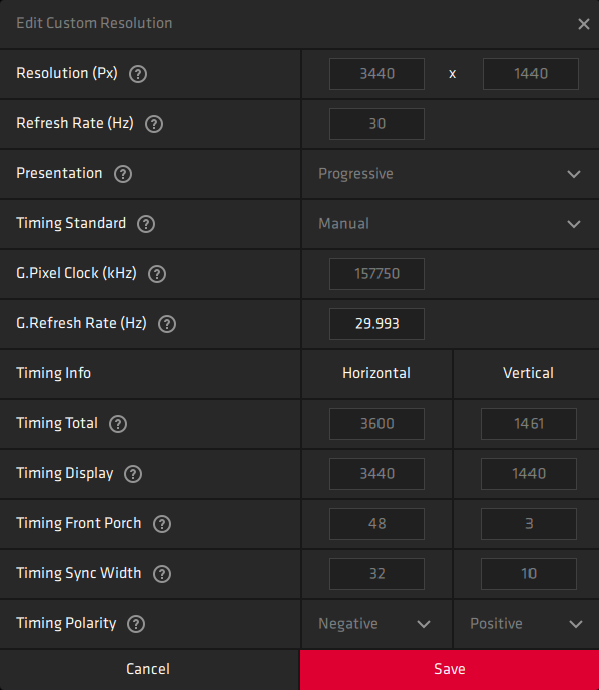
Following are the values you should enter when creating a custom 3440x1440 resolution:
Resolution: 3440 x 1440
Refresh Rate (Hz): 30
Presentation: Progressive
Timing Standard: CVT-Reduced Blanking
G. Pixel Clock (kHz): 157750
G. Refresh Rate (Hz): 29.990 (it will changed to 29.993 by the utility)
Timing Info
Timing Total: Horizontal 3600, Vertical 1461
Timing Display: Horizontal 3440, Vertical 1440
Timing Front Porch: Horizontal 48, Vertical 3
Timing Sync Width: Horizontal 32, Vertical 10
Timing Polarity: Negative, Positive

Comments
Post a Comment