Posts

Showing posts from October, 2022

Oracle ORA-0600 on 17090 - When login with wrong password

Product: Oracle Database 19c Symptom When login to Oracle database to a specific user with wrong password, instead of getting ORA-01017, it shown following error, and disconnected the session $ sqlplus tester1/****** SQL*Plus: Release 19.0.0.0.0 - Production on Wed Oct 26 11:12:16 2022 Version 19.3.0.0.0 Copyright (c) 1982, 2019, Oracle.  All rights reserved. ERROR: ORA-00600: internal error code, arguments: [17090], [], [], [], [], [], [], [],[], [], [], [] This only affecting 1 DB user, and not global Analysis Tested with several DB user, and found that only affecting 1 DB user account Checked alert.log file, and found the trc file that generated Following is the content of the trc file with additional failure detail: 2022-10-26T11:12:17.635430-07:00 Unified Audit record write to audit trail table failed due to ORA-1012. Writing the record to OS spillover file. Errors in file /dbf/diag/rdbms/ORCL/ORCL/trace/ORCL_ora_527371.trc  (incident=97297): ORA-00600: internal error cod...
Windows 10: Converting MBT to GPT+EFI Partition Type

Image
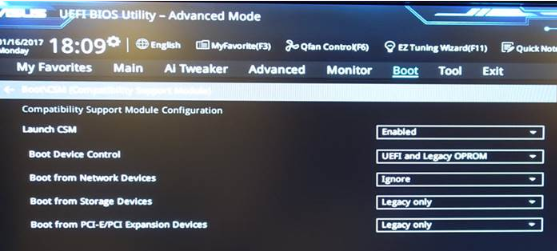
Product: Windows 10 Command: mbt2gpt.exe Sharing my experience to convert my MBT boot partition that run Windows 10 to GPT with EFI boot. Let me list down the step I took for my ASUS Z97-A motherboard: Run "CMD" as administrator Determine the disk number diskpart - utility to query disk partition Ref: https://learn.microsoft.com/en-us/windows-server/administration/windows-commands/diskpart list - list all disks select disk 0 - this is my boot disk, i.e. C: detail - show all partitions. Ensure the partition size match my C: and double confirm disk 0 is correct Boot into recovery mode Click Start >  Settings to bring up Windows Setting (Control Panel) Click Update & Security menu Click Recovery menu Convert disk 0 MBT partition to GPT for entire disk.  This will convert entire disk to GPT partition design.  It is not possible to only convert specific partition mbt2gpt /convert /disk:0 Example output MBR2GPT will now attempt to convert disk 0. If conversion i...

AMD Custom Resolution Setting for BenQ EX3501R Ultra Wide Monitor

Image
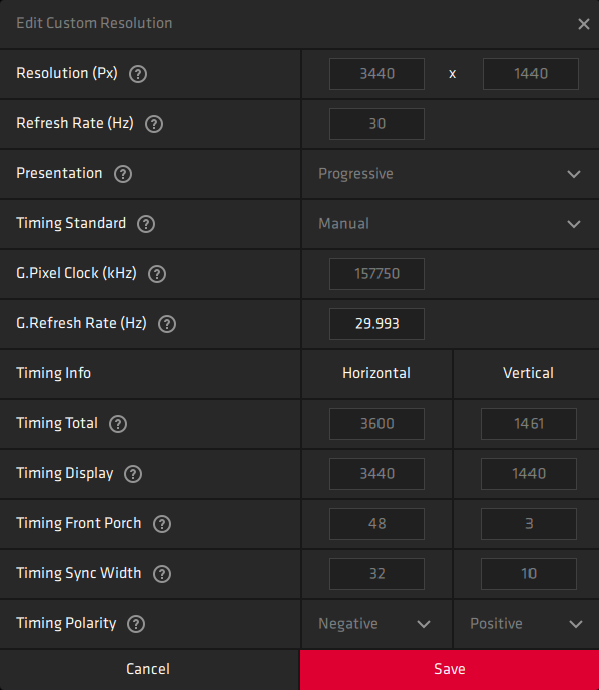
 Product: BenQ EX3501R Ultra Wide 35" Monitor AMD Radeon Ver 2021/-511.1532.24954 GPU: AMD Radeon HD 7870 Bought the popular 35" ultra wide monitor that support 3440x1440 30Hz HDR.  Tried to configure it to work with older AMD GPU, but found that Windows 10 doesn't offer a list of this resolution. All the detected resolutions are leadings to improper size, and not fill up the entire monitor. After days of testing, and struggling, then I found that I have to install the full Radeon driver in order to launch AMD Radeon Softwere to be able to create custom display resolution. When I got into the custom display resolution screen, then I was confused with a series of values to enter.  BenQ homepage provides no help to fill in the values, so I have to look online how to derive all these parameters based on the resolution of 3440x1440 29.970Hz refresh rate (got the refresh rate from other GPU that works). Following are the values you should enter when creating a custom 3440x1440...